Most service businesses qualify leads the slow way: a call or an email thread where the same questions get asked, answered, and written down by hand. By the time you know whether the person is a fit, you have spent half an hour on them. A scored assessment moves that work to before the call, and lets the lead do it themselves.
This guide is for founders who run a service business, whether coaching, advising, real-estate or lending intake, and want to know how to design a lead qualification quiz that actually sorts people well. It draws on one live build: a scored assessment, results page, embedded booking and admin screen for Thrive Calibrate, a coaching business. The examples below that use numbers are made up; the facts about the Thrive build come from the real project.
What is a scored lead-qualification assessment?
It is a short questionnaire in which each answer is worth points, the points add up to a score, and the score decides what the lead sees next. A form collects information. A scored assessment also makes a decision: it puts each person in a band, so you know who to talk to first and who needs something else.
The common advice from quiz tools is sound, and worth following. Ask about the problem the person has, their budget, their timeline and who makes the decision. Map the total to a result. Give people who do not qualify something useful instead of a call. The part those tools say less about is how to design the scoring itself, and what you, the owner, need to see on your side of it.
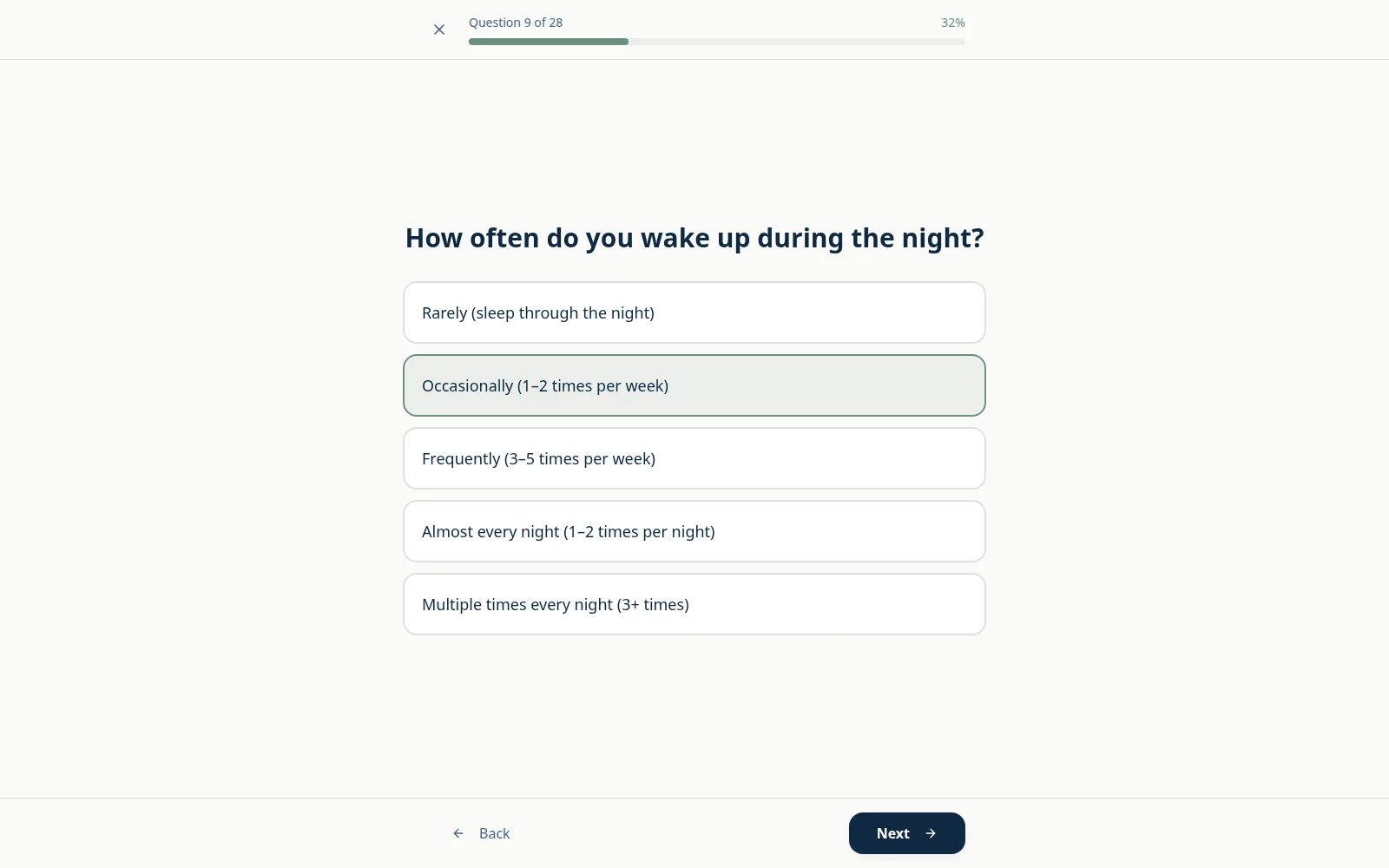
Thrive Calibrate is a coaching business that was growing out of one-to-one work. Every inquiry meant back-and-forth, calls started cold, and the website was a dead end. The assessment turned that around: lead qualification became self-serve, and call-prep and intake dropped from tens of minutes to a few. The lead answers one question at a time, with progress shown, and the coach receives the context before the call starts.
How should the scoring work?
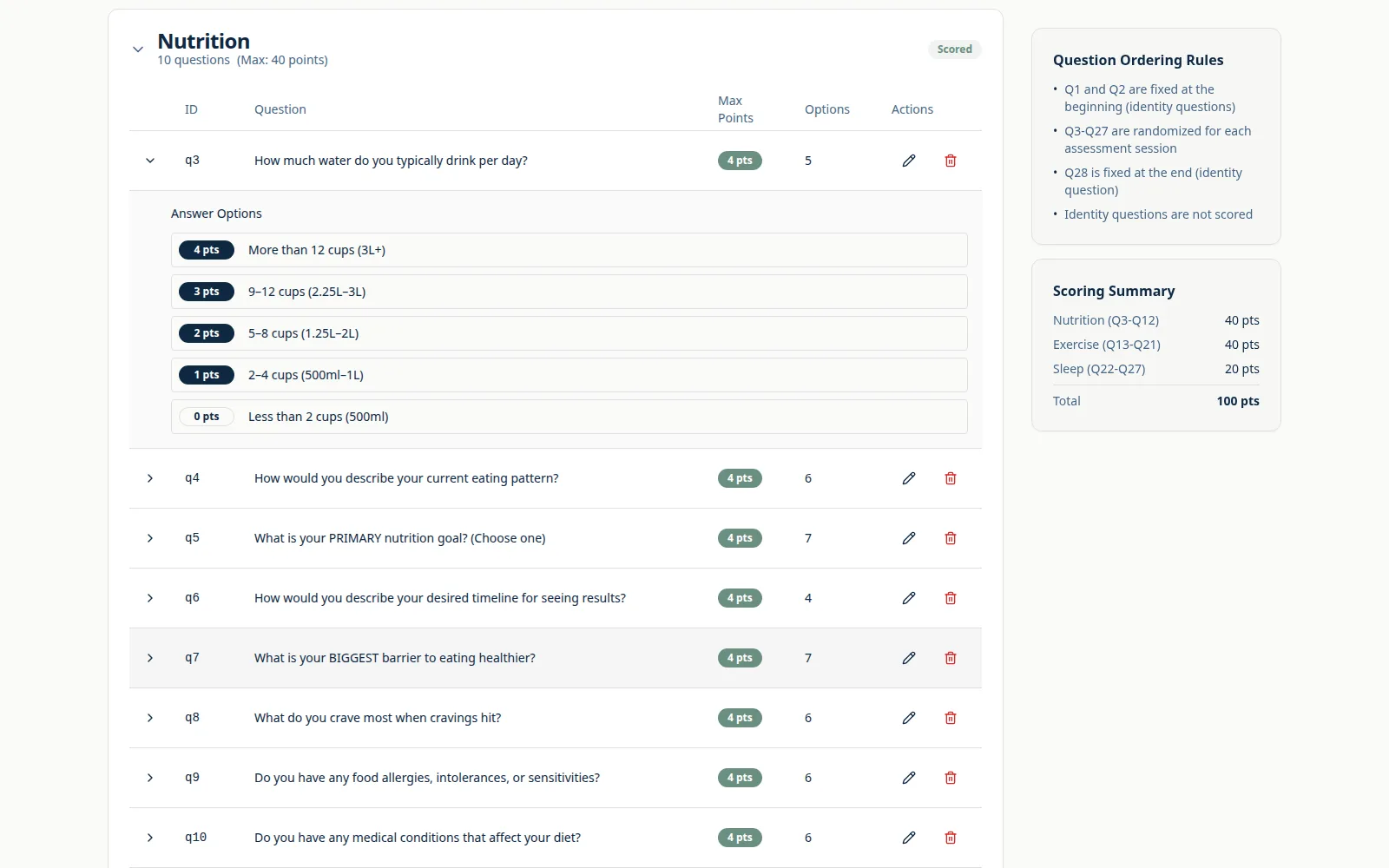
Pick a fixed total, split it across a small number of themes, give every answer a points value, and decide the bands before you write the questions. The Thrive assessment has 28 questions, 25 of them scored, worth 100 points in all, split 40 / 40 / 20 across three pillars. Three questions carry no points at all. Unscored questions are a good place for context you want before a call but would not use to rank anyone.
Why three pillars and not one total? Because a single number hides the reason. Two leads can both score 55 and need completely different conversations: one is a poor fit but urgent, the other is a good fit with no timeline. Scoring by theme keeps that difference visible to you.
Here is how that could look for a service business that takes on clients by referral, such as a small lending or property-advisory firm. These figures are invented to show the shape:
| Theme | What the questions ask | Points |
|---|---|---|
| Fit | Is the problem one you solve? Is it inside the kinds of work you take? | 40 |
| Urgency | When does it need solving? What does waiting cost them? | 40 |
| Readiness | Is there a budget? Who signs off? | 20 |
| Total | 100 |
Example figures for illustration. Your themes and weights should come from what actually separates good clients from bad ones in your business.
Then map the total to bands, and write the band boundaries down:
- 70 to 100, ready to talk. The result page leads with a booking link.
- 40 to 69, worth a conversation, with some prep. The result explains what to sort out first, and offers a booking too.
- 0 to 39, not yet. The result gives them useful next steps and no call.
One more design choice matters: a total is not the only signal worth having. The Thrive build also flags a primary constraint for the coach, so a lead who needs attention first surfaces even when the overall number looks ordinary. Think about the single answer that should override the total in your business, such as work outside the area you cover, and give it a flag of its own.
What should the lead see, and what should only you see?
The lead should see a band and plain-language labels. You should see the raw numbers, the flags and your own notes. In the Thrive build, respondents see a band and three pillar labels, never raw scores, while the coach sees pillar scores, the constraint flag and private notes.
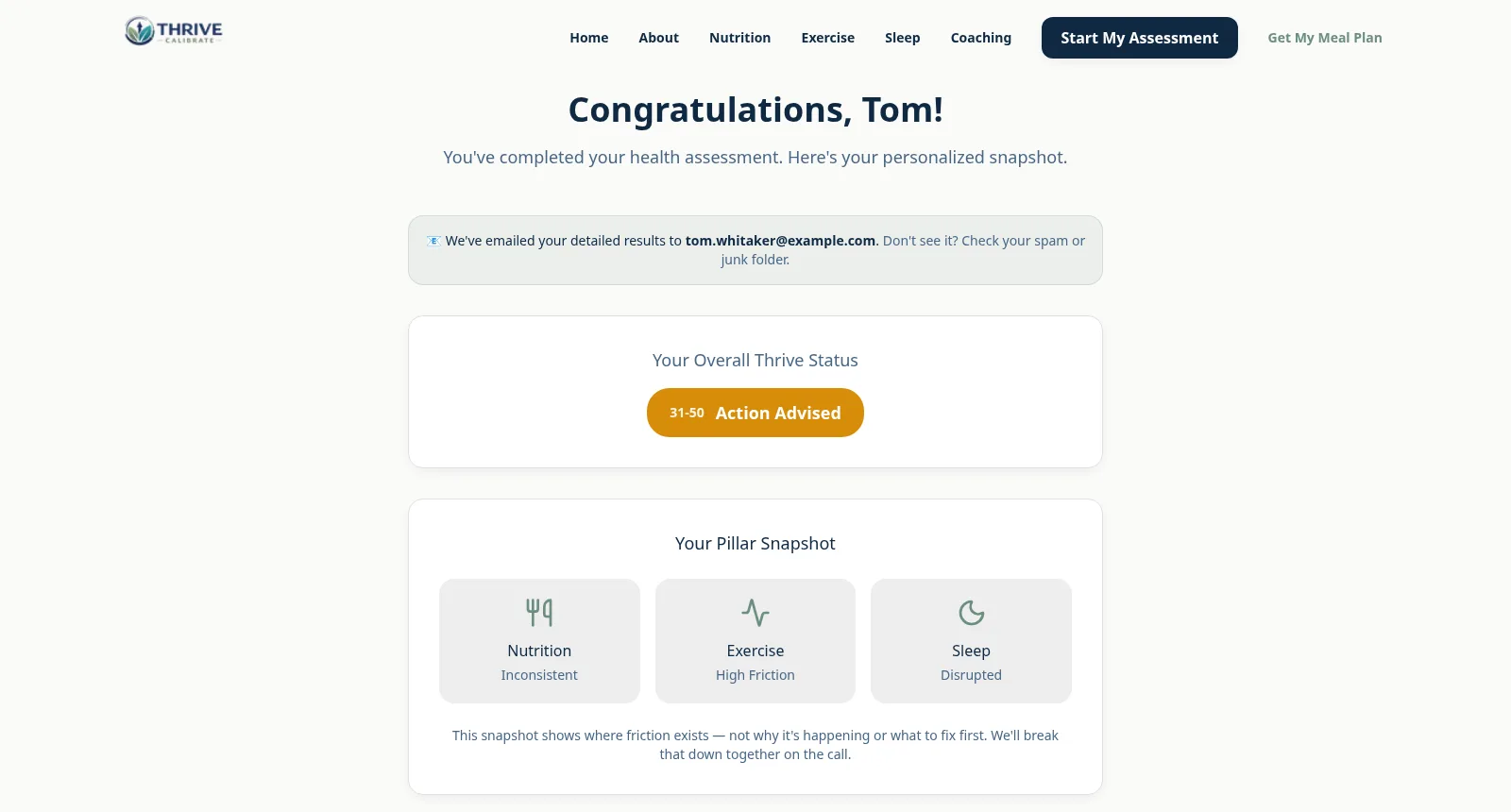
There are good reasons to keep the numbers back. A score of 38 out of 100 reads like a failing grade, and people argue with a grade or try to retake the quiz until it improves. A short, honest label for where they are gives them something to act on. It is also the right place to be useful to the person who is not a fit yet: if the result helps them, they remember you kindly and may come back when they are ready.
The Thrive build adds a second defence against gaming: question order is randomised, which makes it harder to work out which answer is the “good” one. Randomising is easy to forget and hard to bolt on after launch.
Your side of the screen is where the time saving happens. Instead of opening a call cold, you open one submission and see how they scored on each theme, whether the constraint flag is set, and a place for private notes that the lead never sees.
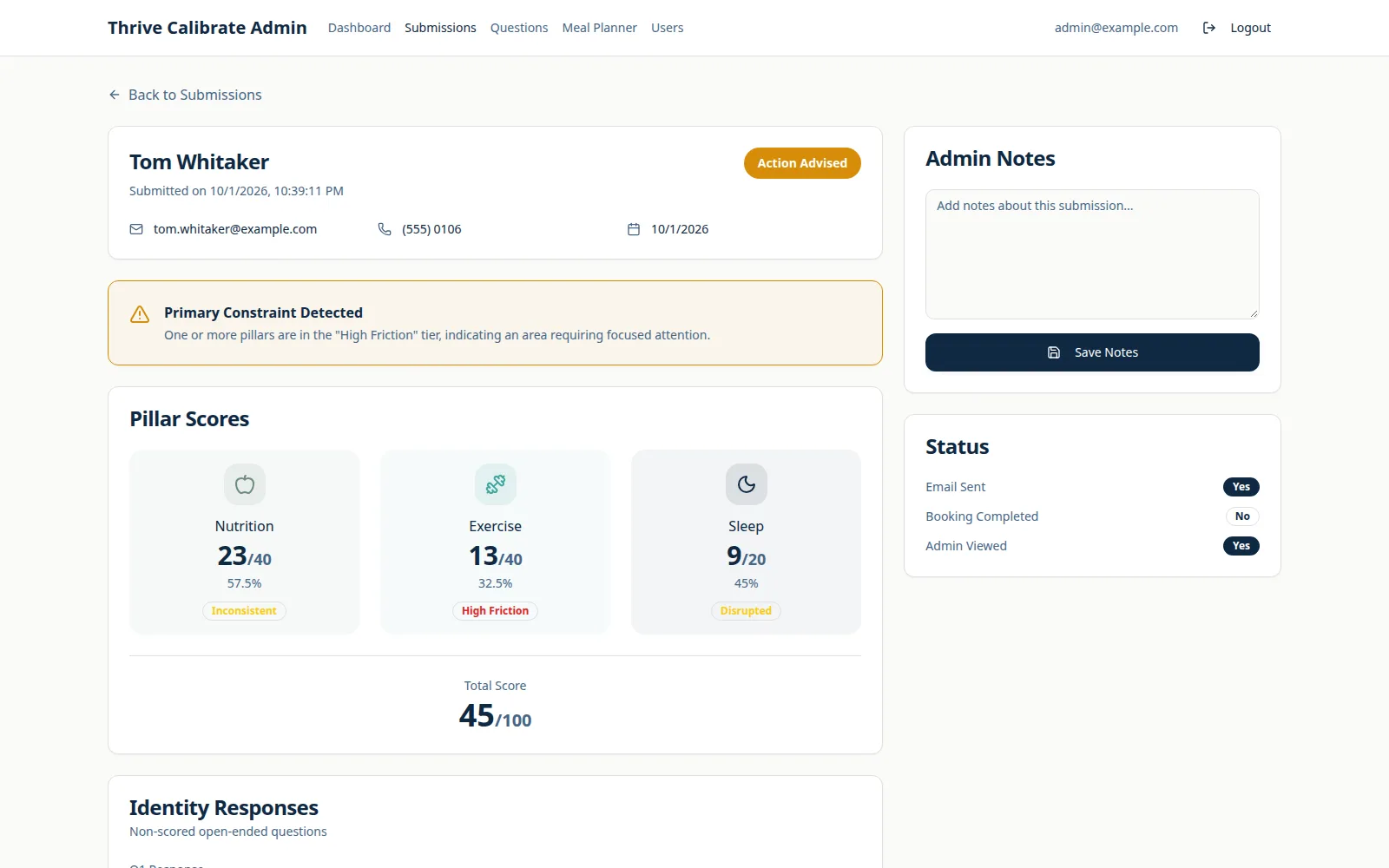
The same screen is what makes call-prep short. The coach reads one page before the call instead of gathering the same context live, which is where call-prep and intake dropped from tens of minutes to a few. From the client’s review:
“It genuinely felt like he cared about the success of the project, not just completing a checklist.”
Should you build it or use a quiz tool?
Use a quiz tool when you need one score, one results page and a simple hand-off to the tools you already use. Build when the scoring is yours to tune, when you need a proper owner view, or when a quiz tool cannot do what you need. Hosted quiz builders are fast to start with and cheap to try, and for many businesses that is the right first move.
The test is to take your real scoring idea and try to set it up in the tool. If every part of it fits, stay there. If you keep hitting limits, the limits are telling you what to build.
| What you need | Usually the better fit |
|---|---|
| One total score and a few result pages | Quiz tool |
| A quick test of whether the idea works | Quiz tool |
| Scores by theme, with weights you set and change | Check the tool carefully; often build |
| A private view with flags, notes and per-theme scores | Build, or extend your CRM |
| Booking, results and the owner view in one flow | Build |
Whichever you pick, one requirement should not change: the owner must be able to edit the questions and the points behind each answer without calling a developer. Scoring is never right on the first try. In the Thrive build, questions and answer points are stored as data and edited from the admin screen, so the coach re-tunes the scoring live with no redeploy.
If you do build, keep the first version small. A scored assessment with a results page, booking and an admin view is one core feature, which is how an MVP build is scoped. A Build Plan is the way to settle that scope first: from $500, ready in 2 to 3 days, credited in full toward the build, and yours to keep either way. You can see the finished product in the Thrive Calibrate case study.
How do you know the scoring is right?
Test it against leads whose outcome you already know, then keep checking after launch. The main risk of any scored quiz is that weak scoring logic screens out good prospects, and you never find out, because they simply do not book. A bad threshold fails quietly.
- Backtest before launch. Take twenty or so past leads, including some who became good clients and some who did not. Answer the questions as you think each of them would have, and see which band they land in. If your best client lands in the lowest band, the scoring is wrong, not the client.
- Read the lowest band. Look through the leads who scored lowest at regular intervals. Are any of them people you would have wanted? If so, move a threshold or reweight a theme.
- Change one thing at a time. If you change three weights at once you will not know which one helped. Keep a short note of what you changed and when.
- Give a way through. A lead in the lowest band may still have a good reason to talk to you. A small “contact me anyway” path means a quiet mistake in your scoring does not cost you a client.
- Compare bands to outcomes. After a few months, check how each band turned into calls and clients. That, and not the quiz tool’s own reports, tells you whether the bands mean anything.
This is also why editing without a redeploy matters so much. Every finding above ends with a change to a question, a weight or a threshold, and each should take minutes. For wider budget questions, read what an MVP really costs.
Questions founders ask
A short questionnaire where each answer carries points. The points add up to a score, the score puts the lead in a band, and the band decides what they see next, such as a booking link or helpful next steps. It qualifies people before any call.
Ask about the problem the person has, how urgent it is, whether there is a budget, and who decides. Keep questions that give context but do not rank anyone unscored, and give every scored answer a clear points value.
A useful result, not a rejection. Show a plain-language label and concrete next steps, and keep the raw score private. Leave a way to contact you anyway, so a scoring mistake does not cost you a good client.
Use a quiz tool if you need one score, a few result pages and a simple hand-off to your CRM. Build when you need weights you can tune by theme, a private owner view with flags and notes, or booking and results in one flow. Either way, the owner must be able to edit questions and points without a developer.
Test it against past leads whose outcome you know, read the lowest band regularly, change one weight or threshold at a time, and compare bands with real outcomes after a few months. Bad thresholds fail quietly, so look for them on purpose.

Technical partner for real-estate and fintech founders: decides with you what to build, launches it and stays on after launch. Top Rated Plus on Upwork with 100% Job Success. Builds MVPs, rescues stalled builds and hardens AI prototypes.
See client work →